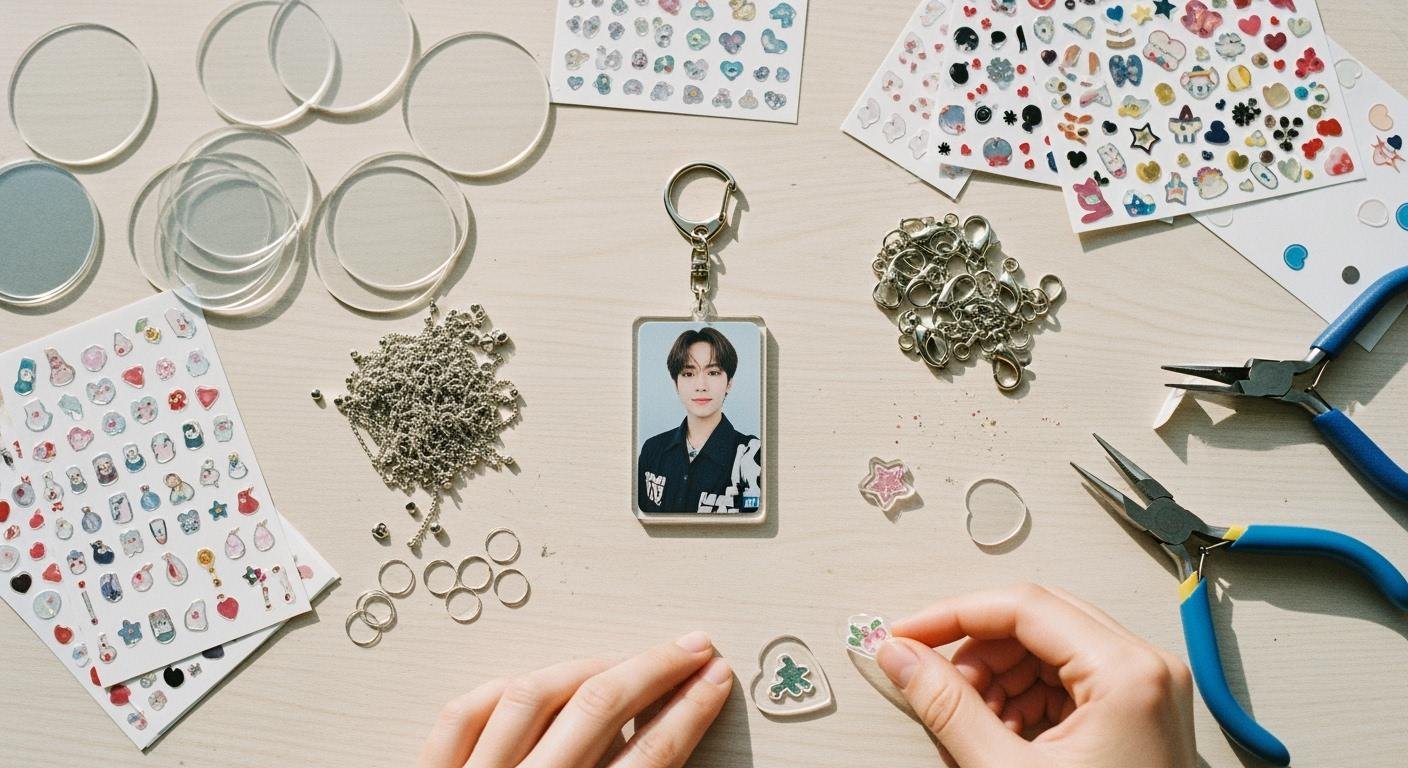
You want to display your favorite K-pop photocard from your collection. The global K-pop events market, which includes merchandise, is projected to reach $20 billion by 2031. This shows how popular the hobby is for collectors. You can easily create your own custom acrylic photocard holder keychains. The process to make a custom photocard holder involves three main stages.
- Design your acrylic photocard holder.
- Order the acrylic keychain.
- Assemble the final photocard holder keychain.
This guide makes creating custom photocard holders for any photocard in your collection simple. You’ll have a new photocard holder for your favorite photocard.
Designing Your Photocard Holder
This is where your creativity comes to life. You will design the shape, art, and dimensions of your custom photocard holder. This stage sets the foundation for your entire project. A good design ensures your final product looks professional and functions perfectly for your photocard collection.
Choosing Your Design Software
You need the right tools to create your design. Your choice of software depends on your budget and experience. Many programs can produce the vector files that manufacturers require.
For beginners, free software is a great starting point. These options are powerful and have strong community support.
- Vectr: This is an excellent choice if you are new to design. It has a very intuitive interface, and you can create your first designs within minutes. It works on most operating systems and even in your web browser.
- Inkscape: Many consider Inkscape the best free alternative to Adobe Illustrator. It is a powerful open-source program for creating the vector files needed for your acrylic project. You can find many tutorials on YouTube to help you learn.
If you have design experience or plan to create many projects, you might consider professional software. Adobe Illustrator is a popular industry-standard option for creating vector designs for a photocard holder. Both Inkscape and Illustrator allow you to prepare your files for manufacturing.
Key Design Elements: Body, Window, & Hole
Every photocard holder has three essential parts. You must include these elements in your design file.
- The Body: This is the main shape of your photocard holder. You can make it a simple rectangle or a custom shape that matches your favorite K-pop group’s theme.
- The Window: This is the cutout where your photocard will be visible. You need to make it slightly larger than the photocard for easy insertion.
- The Hole: This is a small hole for attaching the keychain hardware. You should place it at the top of the body, ensuring it is not too close to the edge.
Designing for K-pop Photocard Holders
You can show your love for your favorite K-pop group through your design. Many k-pop photocard holders feature designs that represent specific groups, idols, or albums. For example, BTS fans often create designs inspired by the BT21 characters, such as Cooky or Tata. These characters were designed by the BTS members themselves.
You can also draw inspiration from other popular character designs to create unique k-pop photocard holders.
- Sanrio Characters: Use beloved characters like Cinnamoroll or My Melody for a cute aesthetic.
- Fandom Symbols: Incorporate logos, light stick shapes, or other symbols unique to your favorite K-pop group.
- Album Art: Base your design on the colors and graphics from a specific K-pop album era.
Creating custom photocard holders with these k-pop themed designs makes your collection truly personal. Your custom photocard holder will be a unique piece for your collection.
Sizing Your Holder for a Standard Photocard
Accurate sizing is crucial. Your photocard needs to fit securely inside the holder. Most standard K-pop album photocards measure 55mm x 85mm. You must design the window of your photocard holder to be slightly larger than the photocard.
Tip: Add 1-2mm of extra space, or “bleed,” on each side of the window. This makes it easy to slide your photocard in and out without damaging it. A window size of 57mm x 89mm is a safe choice for a standard photocard.
Different types of photocards have different sizes. You should always measure your specific photocard before finalizing your design.
| Photocard Type | Common Photocard Size (mm) | Recommended Window Size (mm) |
|---|---|---|
| Standard Album | 55 x 85 | 57 x 89 |
| Mini Tour | 70 x 100 | 73 x 103 |
| Monsta X | 62 x 88 | 65 x 91 |
Preparing Your Artwork for Manufacturing
After you finish your design, you must prepare the file for your manufacturer. This involves saving your work in the correct format and color mode. Following the manufacturer’s guidelines is the most important step to ensure your custom photocard holder turns out perfectly. This step helps avoid delays and printing errors with your collection of k-pop photocard holders.
Understanding Vector vs. Raster Files
Manufacturers require your design as a vector file. Common vector file types are AI, SVG, and EPS. You should not submit raster files like JPG or PNG for the main design shape.
Vector images use mathematical equations to create lines and shapes. This means you can scale them to any size without losing quality. A vector design will always look crisp and clear. Production equipment reads these vector paths with high precision, resulting in clean, professional edges on your acrylic photocard holder.
Raster images are made of tiny squares called pixels. If you zoom in on a raster image, it becomes blurry and pixelated. This makes them unsuitable for the precise cutting needed for a photocard holder.
| Caraterística | Vector Graphics | Raster Graphics |
|---|---|---|
| Scalability | Can be scaled to any size with no quality loss. | Loses quality and becomes blurry when scaled up. |
| Composition | Made of mathematical paths and lines. | Made of a fixed grid of pixels. |
| Best Use | Logos, illustrations, and designs for cutting. | Photographs and complex, detailed images. |
Your custom design will look sharp on the final product. This is why vector files are essential for your k-pop photocard holder project. Collectors who create their own k-pop photocard holders find this step critical for a quality addition to their collection.
Using the CMYK Color Mode
Your computer screen and a physical printer create colors in different ways. Screens use the RGB (Red, Green, Blue) color model, which mixes light. Printers use the CMYK (Cyan, Magenta, Yellow, Key/Black) color model, which mixes physical inks.
You must design your photocard holder in CMYK color mode. This ensures the colors on your final printed acrylic product match the colors you see in your design file. Most commercial printers use CMYK, making it the industry standard for consistent results. Using CMYK is vital for your custom k-pop photocard holder.
Note: Converting from RGB to CMYK can sometimes cause colors to look slightly different. It is best to start your design in CMYK mode from the beginning. If you need to convert, you can do so in your design software.
How to Convert to CMYK in Adobe Illustrator:
- Open your design file.
- Go to the menu and select
File > Document Color Mode. - Choose
CMYK Colorfrom the options.
Your file is now ready for printing. This simple step ensures your custom k-pop photocard holder looks exactly as you imagined, ready to display a photocard from your K-pop collection.
Finding a Manufacturer for Your Order
You have a finished design. Now you need to find a company to produce your custom photocard holder. This step connects your digital art to a physical product for your photocard collection. Choosing the right partner is key to getting the best photocard holder for your favorite photocard.
How to Find Acrylic Keychain Makers
You can find many manufacturers online that specialize in custom acrylic products. Popular options for K-pop fans and small creators include Vograce and Zap! Creatives. These companies are known for their quality and user-friendly ordering processes. You can also use platforms like Alibaba to connect with suppliers, but you should check their history and reviews to ensure they are reliable. Many collectors start with a small batch. Finding a manufacturer with no minimum order quantity (MOQ) is great for a first project. This lets you order just one keychain to test your design.
| Manufacturer Name | Minimum Order Quantity |
|---|---|
| MelodyCharms | 1 piece |
| Vivipins | 1 piece |
| EverLighten | 1 piece |
| GS-JJ | 1 piece |
| Zap! Creatives | 10 pieces |
| CustomKeyChainNow | 25 pieces |
Understanding Product Specifications
Each manufacturer has a list of product specifications. These are the options you can choose for your photocard holder. You will select the size, material thickness, and special finishes. Carefully reading these specifications ensures your final photocard holder looks exactly how you want it to. This is important for your custom collection.
Choosing Size, Thickness, and Finish
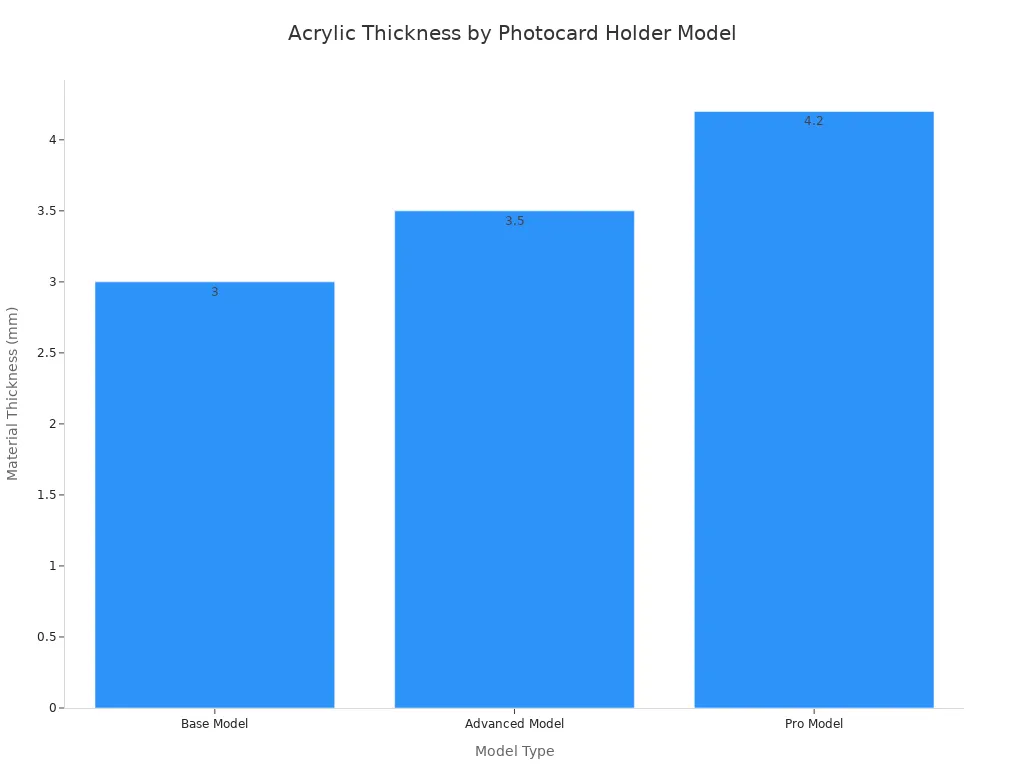
You will first confirm the overall size of your photocard holder. Next, you must choose the acrylic thickness. A standard thickness of 3mm is durable enough for daily use. Thicker options offer more durability for your photocard.
You also need to select a finish. The finish affects how your design looks. A glossy finish makes colors pop, while a matte finish reduces glare. This choice impacts the final look of your custom photocard holders and your K-pop photocard collection.
| Caraterística | Matte Finish | Glossy Finish |
|---|---|---|
| Appearance | Non-reflective, understated | Shiny, polished, vibrant |
| Fingerprints | Hides smudges well | Shows fingerprints easily |
| Color Vibrancy | Muted, softer colors | Enhanced, deep colors |
Adding Special Effects like Epoxy or Glitter
You can add special effects to make your photocard holder unique. An epoxy coating is a popular choice. It adds a smooth, rounded dome over your artwork. This protects the printed design and gives the photocard holder a premium feel. Glitter is another fun option. You can mix it into the acrylic to make your K-pop photocard holder sparkle. These custom touches make your collection stand out.
Submitting Your Design & Approving a Proof
The final step is to upload your vector file and approve a digital proof. A proof, or mock-up, is a digital image showing how your design will look on the final product. It is your last chance to check for any errors in the artwork, colors, or cut lines.
Important: Review your proof very carefully. Once you approve it, the manufacturer will begin production. A careful check ensures you get the best photocard holder for your favorite photocard. This makes a great addition to your K-pop photocard collection.
Assembling Your Acrylic Photocard Holder Keychains
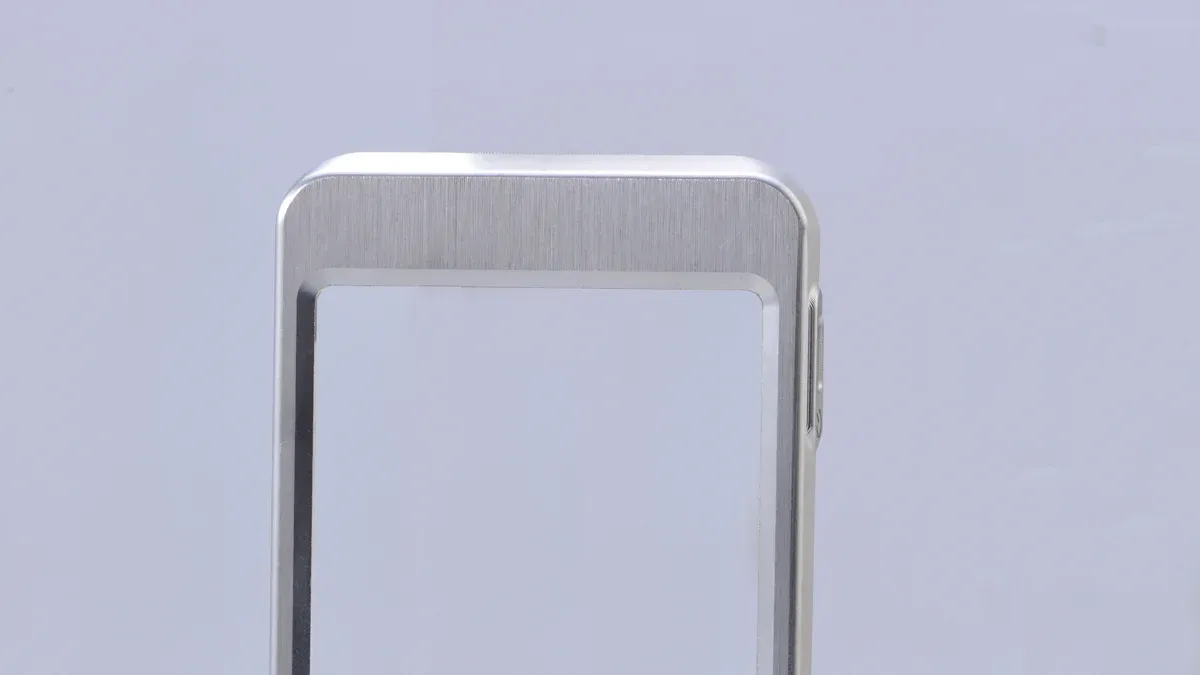
Your package has arrived. You are now ready for the final and most exciting stage. You will assemble your custom acrylic photocard holder keychains. This step brings your project to completion. Soon, you will have a new photocard holder for your favorite K-pop photocard. This new item will be a great addition to your collection.
What to Expect in Your Package
You should find a few items inside your package. You will receive the printed acrylic pieces for your photocard holder. You will also get the keychain hardware. The manufacturer sends these parts separately. This prevents scratches during shipping. Your job is to put them all together to create the final photocard holder keychain.
Peeling the Protective Film
Your acrylic pieces will have a thin plastic film on them. This film protects the surface from scratches. You need to peel it off to reveal the shiny design underneath. This step requires a gentle touch.
Tip: Use a piece of adhesive tape on a corner of the film. Press the tape down firmly, then lift it. The film should peel up with the tape. You can also carefully use tweezers to lift a corner without scratching the acrylic.
Attaching the Keychain Hardware
Now you can attach the hardware to your photocard holder. Your photocard holder has a small hole for this purpose. Most hardware includes a jump ring and a clasp.
- Lobster Clasps: These are very popular. They have a spring-loaded gate that is easy to open. Their swivel base also stops your keychain from twisting.
- Carabiner Hooks: These offer a secure clip for your photocard holder keychain. They are strong and easy to attach to a bag or belt loop.
Open the jump ring, loop it through the hole on your photocard holder, and attach the clasp. You now have a functional piece for your K-pop collection.
Inserting Your Photocard for Display
This is the final step. You can now display your favorite K-pop photocard. Gently slide your photocard into the window of the photocard holder. To protect your photocard from any movement, you should use a sleeve.
Using a thin plastic sleeve, often called a penny sleeve, is a great idea. It protects your photocard from scratches inside the acrylic photocard holder. This keeps your K-pop photocard in perfect condition for your collection.
Your custom photocard holder is now complete. You have successfully created a unique item for your K-pop collection. Enjoy showing off your favorite photocard in your new photocard holder. The finished acrylic photocard holder keychains will look great with your collection.
You have learned the three key stages for your project. You design your custom photocard holder, order it, and assemble the final piece for your favorite photocard. Creating custom acrylic photocard holder keychains is a fun way to display a special photocard. You can show off your favorite photocard. Start your project today and enjoy your new acrylic photocard holder keychains for your photocard. This photocard will look great. Your photocard deserves a special holder. Protect your photocard. Display your photocard. Cherish your photocard. This is the best photocard.
FAQ
What if my photocard is not a standard size?
You should always measure your specific photocard. Many photocards have unique dimensions. Adjust the window size in your design file to fit your photocard. This ensures your special photocard has a perfect home.
How do I protect my photocard inside the holder?
You can use a thin plastic sleeve. This sleeve protects your photocard from scratches. It also prevents the photocard from moving around inside the holder. Your photocard will stay in mint condition.
Can I print a design on both sides?
Yes, most manufacturers offer double-sided printing. You can have different artwork on the front and back. This option lets you create a more dynamic design for your favorite photocard. Each photocard can have a unique look.
Can I use a regular photo instead of a K-pop photocard?
Absolutely. You can use any picture you like. Just trim the photo to fit the holder’s window. This is a great way to carry a picture of a pet, a friend, or a family member. The holder works for any small photocard or photo.
See Also
Acrylic Sign Holders: Understanding Their Purpose, Design, and Uses
Elevate Your Decor: Acrylic Trays with Inserts for Unique Style
Transform Your Home: 10 Creative Styling Ideas for Small Acrylic Trays
Personalize Your Space: Elegant Acrylic Tray Ideas for Unique Style
Acrylic Cosmetic Organizers: Defining Their Role and Practical Applications
 Português
  English
  Français
  Русский
  Deutsch
  Español
  日本語
日本語